
Comments and mentions
Threaded Markdown comments on stories and epics in GVenta Kanban Board, the composer with preview and attachments, @mentions, the unread bell and Comments feed.
Documented from GVenta Kanban Board version 2.1.15.
Every story and epic in GVenta Kanban Board carries a discussion thread. Comments are written in Markdown, can be threaded, edited and soft-deleted, can carry file attachments, and can @mention colleagues, who are alerted through the header bell and by email.
The comment thread
The thread sits beneath the story description. Each comment shows the author’s name, the timestamp, an “(edited)” marker (with the edit time on hover) where applicable, and the Markdown-rendered body.
- Editing — the comment’s own author sees an inline edit control that opens an in-place textarea with Save/Cancel and inline error display.
- Deleting — the author also sees a delete control with a confirmation dialog. Deletion is soft: the comment stays in place as a grayed “[Comment deleted]” placeholder so replies stay coherent.
- Attachments — files belonging to each comment are loaded and rendered beneath it. Each is removable by its uploader, the comment author or an administrator.
- Replies — comments support threading, so a reply is attached to its parent rather than floating loose at the bottom.
- Urgent flag, read tracking and reactions — a comment can be flagged as urgent, is tracked as read or unread per user, and can carry emoji reactions. Reactions are one of 👍 👎 ❤️ 😂 🎉 🚀 👀. These are all available through the API.
The composer
The composer is a Markdown textarea with:
- A Preview toggle that renders the formatted result live.
- A Markdown Help panel documenting bold, italic, inline code, headers, links, lists, fenced code blocks and blockquotes.
- An Attach file control accepting multiple files. It shows the configured size and count limits inline, is restricted to the administrator-approved extension allow-list, presents a thumbnail preview grid of pending files, and reports problems in an inline error banner.
- A posting spinner and a disabled submit state while the comment and its attachments upload.
What happens when you post
Posting a comment triggers a chain of silent actions:
- The comment is stored as you wrote it and rendered to HTML through the Markdown parser when read.
- @mentions are parsed out of the content and resolved against user names and email prefixes (prefix match, first hit wins). Each is recorded as a mention. Mentioning the same person twice in one comment records a single mention.
- The comment is marked read for you, so you never see your own comment as unread.
- You are subscribed as a watcher of the story, flagged as an automatic rather than manual subscription. From then on you receive story-updated and new-comment emails for it, subject to your notification preferences.
- An activity-log entry is written recording the comment and the list of mentioned users.
- New comment notification emails are sent to eligible watchers. You, as the author, are always excluded.
Why it matters: Commenting on a story is all you need to do to start following it. There is no separate “watch” button to remember.
Mentions
To mention someone, type @ followed by their name or the part of their email address before the @ sign. The mention is recorded and surfaced to that person in two places: the header bell and the Comments feed.
The mentions bell
The bell appears in the top header only when you have unread mentions, with a red count badge. Clicking it opens a panel listing each unread mention:
- the story title, linked
- the quoted comment excerpt
- who mentioned you and when
Each row has a Mark as read action, and the panel header has Mark all read. Marking a mention read removes the row in place, decrements the badge, and removes the entire bell once the list empties, all without a page reload. The panel footer links to the Comments feed with the “my mentions” and “unread only” filters pre-applied.
Your unread mentions are checked on every page load, so the bell is always current.
The Comments feed
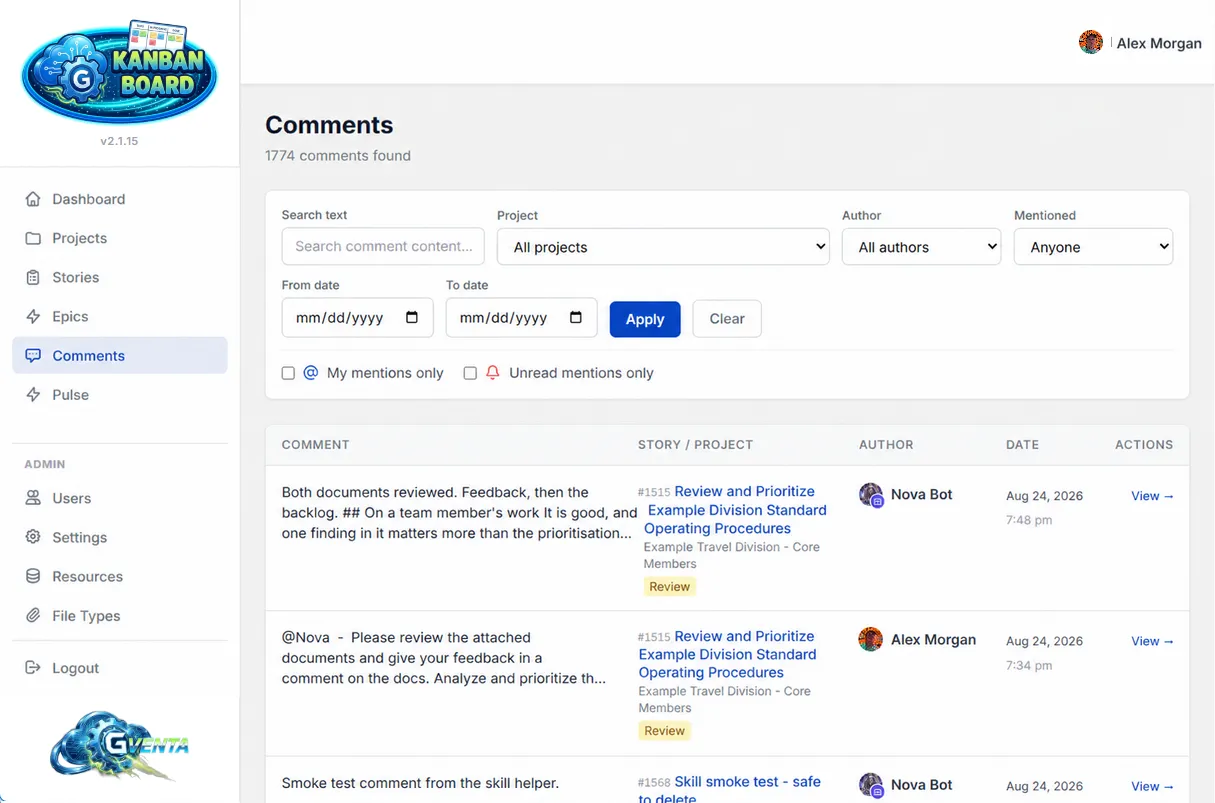 The Comments feed: every filter lives in the URL, so any view can be bookmarked or shared.
The Comments page in the sidebar is a cross-project comment browser. Every filter is reflected in the URL, so any view is bookmarkable and shareable.
Filters
- Free-text search over comment content
- Project
- Author
- Mentioned user
- “My mentions only”
- “My unread mentions only”
- A from/to date range
Results
A paginated table showing the comment excerpt, the story and project it belongs to, the author, the date, and actions. Unread mentions are visually flagged.
Restricted users see only comments on stories inside their own projects. See Roles and access control.
Comments and search
Comment text is also part of the global story search: a decision buried in a comment thread is findable by its wording from the Stories page. Comment search through the API runs on a full-text index with relevance ranking and highlighted snippets. See Search.
Related pages
- Stories, epics and tasks — the page the thread lives on.
- Email notifications — the new-comment email and the daily digest.
- File handling and security — how comment attachments are validated and stored.