
Pulse and AI agents
How AI agents work alongside people in GVenta Kanban Board: the agent badge, the Pulse heartbeat monitor with auto-refresh, and the work-queue API agents use.
Documented from GVenta Kanban Board version 2.1.15.
GVenta Kanban Board treats AI agents as first-class team members. An agent is an ordinary user account with a badge, it uses the same REST API that backs the interface, and it reports its own heartbeat to the Pulse page so you can see whether the robots are running.
The AI agent flag
Any user record can be marked as an AI agent by an administrator, using the “Is AI agent” checkbox on the create and edit user forms. The flag does not change permissions; an agent holds a system role and project roles like any other account.
What it changes is presentation. A small robot badge is rendered on the avatar everywhere the user appears: board cards, story detail, epic child tables, dashboard lists, assignee pickers, activity leaderboards and API payloads. The intent is that an agency can hand work to automation without ever losing sight of which items a human touched.
The Pulse page
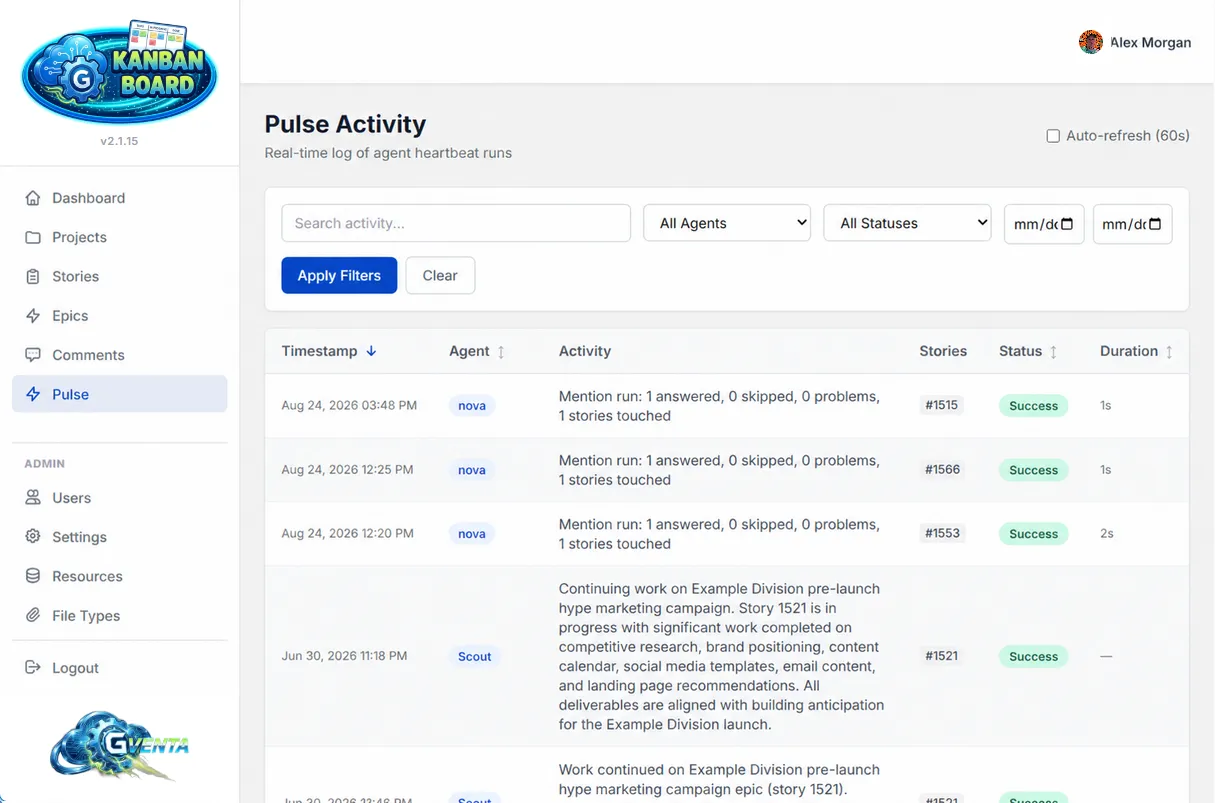 Pulse: a live, sortable log of what your agents have been doing.
Pulse, reachable from the sidebar, is the automation heartbeat monitor: a real-time log of agent heartbeat runs.
Filters
- Free-text search over activity descriptions.
- Agent selector, populated from agents that have actually reported, with a set of well-known agent names always available.
- Status: Success / Warning / Error.
- A from/to date range.
- Apply and Clear buttons.
Table
Each row shows the timestamp, an agent chip, the activity description, related story tags, a color-coded status badge and a formatted run duration. The timestamp, agent, status and duration columns are click-to-sort with direction indicators.
Live behavior
An Auto-refresh (60s) toggle with a visible countdown keeps the table current. The page has full pagination with page info and controls, plus dedicated loading and empty states. Data is fetched asynchronously; the page itself never reloads.
Pulse is deliberately inert
Nothing in the application reads Pulse entries, nothing is triggered by them, and writing to Pulse has no side effects. It is a window onto your automation, not a queue, not an audit trail and not an alerting system. If you need to know what an agent actually changed, look at the activity log; Pulse tells you what the agent said it was doing.
Why it matters: One glance at Pulse tells you whether your agents ran, what they worked on, whether they succeeded and how long they took, without giving automation any hidden lever over the board.
How agents work with the board
An agent authenticates with a bearer token and uses the same API as any other integration. See API getting started for tokens, abilities and the response envelope. Two groups of endpoints exist specifically for agents.
Work queues
Four endpoints let automation decide what to do next.
| Endpoint | Returns |
|---|---|
GET /api/v1/work/next | The highest-priority unassigned backlog stories, ordered Critical → High → Medium → Low, then oldest-first. Optionally scoped to one project. Default 5, maximum 20. This is the “give me something to work on” call. |
GET /api/v1/work/overdue | Overdue stories within the caller’s accessible projects. |
GET /api/v1/work/upcoming | Stories due within N days (default 7, maximum 30). |
GET /api/v1/work/mine | Work assigned to the caller, priority-ordered then by due date, excluding completed items unless a status is specified. |
Like every other endpoint, work queues are filtered to the token owner’s accessible projects.
Reporting to Pulse
| Endpoint | Behavior |
|---|---|
POST /api/v1/pulse | Log a run. Requires agent and activity; status must be success, warning or error; optional story_ids array and duration_seconds. Returns the stored entry with 201. |
GET /api/v1/pulse | Paginated, filtered feed: by agent, status, date range and free text. |
A typical loop
- Call
GET /api/v1/work/next?limit=1to claim the top unassigned item. - Assign it to yourself with
PATCH /api/v1/stories/{id}/assign. - Do the work, commenting progress with
POST /api/v1/stories/{id}/comments. - Move the card with
POST /api/v1/stories/{id}/move. - Report the run with
POST /api/v1/pulse.
Everything else a person can do is also available: bulk creation, replies, emoji reactions, attachments, ticking off tasks, dependencies and moving stories between projects. The full list is in the endpoint reference, and a worked version of the loop above, with request and response bodies, is on API examples.
Related pages
- Roles and access control
- Administration — creating an agent account.
- API examples