
Search
How search works in GVenta Kanban Board: the deep global story search, resolving a bare story ID, filtering epic lists, and finding comments across projects.
Documented from GVenta Kanban Board version 2.1.15.
GVenta Kanban Board has several ways to find things: a deep global story search, a story-ID resolver for links pasted into chat, filterable epic lists, and a cross-project comment search. Every one of them respects your access: restricted users only ever see results inside their own projects.
Global story search
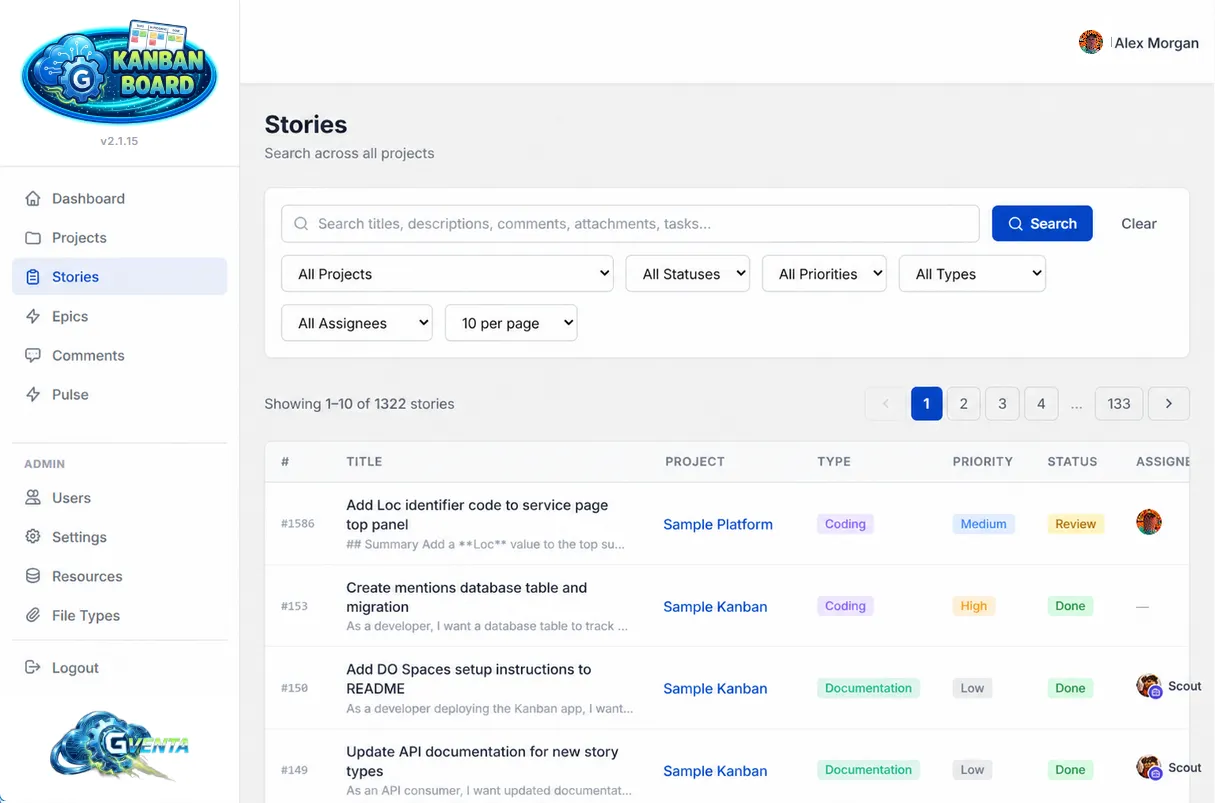 Global story search across every project you can access.
The Stories page in the sidebar is a cross-project story finder.
Filters
- Free-text query
- Project
- Status
- Priority
- Type
- Assignee
- Results per page (10 to 100, rounded to tens)
The assignee dropdown is narrowed to the people you can actually see.
What the text query actually searches
The free-text query is not limited to titles. It searches:
- story titles
- story descriptions
- every comment on the story
- every attachment filename on the story
- every task title and task description on the story
A file called client-brief-v3.pdf attached to a story eighteen months ago is findable by name. A decision buried in a comment thread is findable by its wording. A checklist item is findable by what it says.
Results
Results render as a paginated table with story ID, title, project, type, priority, status, assignee and dates. Click a row to open the story.
Why it matters: You rarely remember which story something was on, but you usually remember a word from it. One search box covers the description, the discussion, the checklist and the filenames.
Resolving a story ID
Story URLs are normally project-scoped. If all you have is a bare story ID, for example one pasted into a chat message, you can open https://your-instance.example/stories/{id}. The application looks up the story’s owning project, checks that you have access to it, and redirects you to the canonical project-scoped URL. If the story does not exist, or it is requested under the wrong project, you get a 404 page; if you are not permitted to see it, a 403.
Epic lists
Project epics list
Each project has a filterable, paginated table of its epics, reached from the View All link on the board’s epics strip. Filter by:
- Query text
- Status
- Priority
- Type
- Assignee
- Page size
Each row shows the epic, its child count, its completion progress and its assignee.
Global epics list
The Epics page in the sidebar shows the same table across every project you can access, with an additional project filter and an Assigned to Me shortcut in the assignee dropdown. Columns: ID, title, project, type, priority, status, story count, progress and assignee.
Comment search
The Comments page is a cross-project, URL-driven comment browser, so any search you build is bookmarkable and shareable. Filter by:
- Free-text search over comment content
- Project
- Author
- Mentioned user
- “My mentions only”
- “My unread mentions only”
- A from/to date range
Results show the comment excerpt, the story and project it belongs to, the author, the date, and actions, with unread mentions visually flagged. The full page is described in Comments and mentions.
Board filtering
The project board has its own live filter bar that narrows cards by title text, assignee, priority, type and due date entirely on the client, with no server round trip. It is documented on The project board.
Searching through the API
Automation has the same reach:
GET /api/v1/stories/searchis the deep search, covering titles, descriptions, comments, attachment filenames and task text, with project, status, priority, type and assignee filters andpage/per_pagepagination.GET /api/v1/storieslists stories with asearchfilter andlimit/offsetpagination.GET /api/v1/searchis a quick story search with a two-character minimum.GET /api/v1/comments/searchis a full-text comment search with relevance ranking, highlighted snippets and rendered HTML, filterable by project, user, story and date range.
See API getting started, the endpoint reference and the deep search example.
Related pages
- Stories, epics and tasks
- Roles and access control — how results are filtered for restricted users.